DAY 2 : Basics Linux Commands
Day2 : Introduction to Linux #90DaysofDevops

Experienced AWS DevOps Engineer with 9+ years in IT, specializing in AWS for over 5 years. Holder of 5 AWS certifications, adept at optimizing infrastructure and driving efficiency.
Linux, a vibrant open-source operating system comprising the Kernel, was graciously unveiled by Linus Torvalds on September 17, 1991.
Embraced by 91% of applications on the Internet, Linux stands tall with robust security features, offering the gift of multiuser functionality and seamless multitasking.
Diverse as the flavors of Indian spices, Linux manifests in various versions, each adding its distinct essence:
UBUNTU
FEDORA
KALI LINUX (Prized for its prowess in ethical hacking)
REDHAT
CENTOS
SUSE, and more.
Architecture of LINUX:
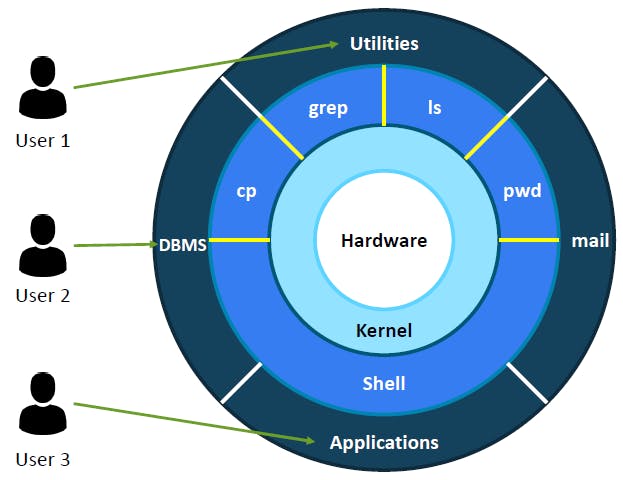
-Users can interact with Kernel by Shell.
-Kernel is heart of the Linux where code is present.
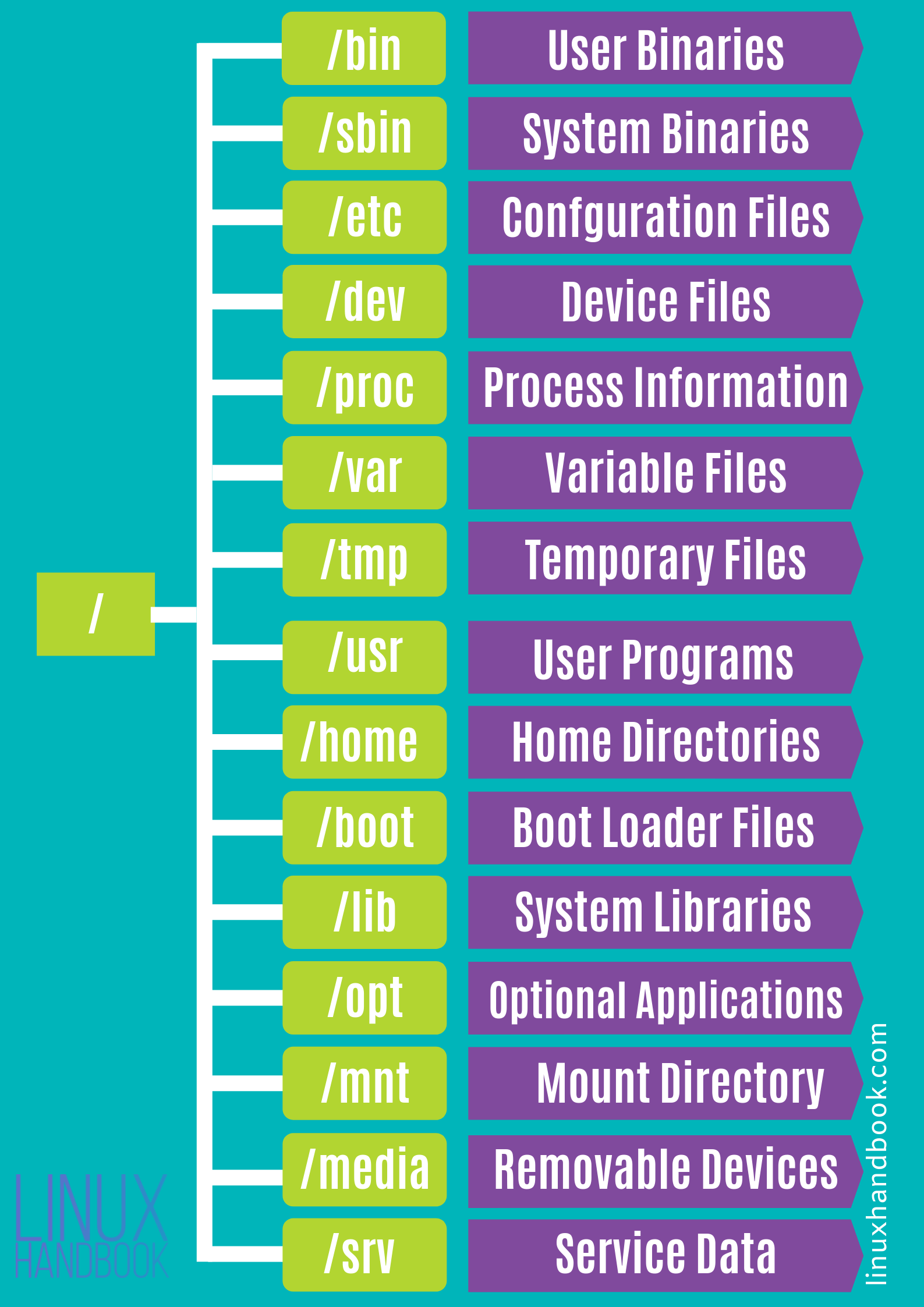
File System Hierarchy of Linux:
Basic Linux Commands-
1.Check your present working directory.
"PWD" stands for Print Working Directory. The "pwd" command prints the full name/full path of current/working directory.

2.List all the files or directories including hidden files.
"ls -a" command is used to list all hidden files of present working directory.

3.Create a nested directory train/with/shubham/happy/learning
mkdir -p command used to create sub-directories of a directory.

4.bin-this command is used to check installed softwares/apps
the standard directory for binary files or packages is /usr/bin, where most of the system-specific binaries are found. Also, /user/local/bin is where non-system binaries i.e. locally compiled or maintained packages are kept. However, both of these directories are for all system-wide users.

#day02challenge #90daysofdevops
Thank You,
Heartfelt thanks to each and every one who has graciously taken a moment to read, engage, and bolster my journey.
Do feel free to connect if there are any suggestions or additions needed for the blogs. Your valuable feedback is not just welcomed but cherished.
~ Suresh Kumar 🙂


